Funding and Service Details (FSD) Contract
Refer to Contract to confirm this contract will suit your requirements before proceeding.
FSD Overview
In the overview diagram:
-
 - is the procurement project including its workflow tasks
 -
 - is the contract.
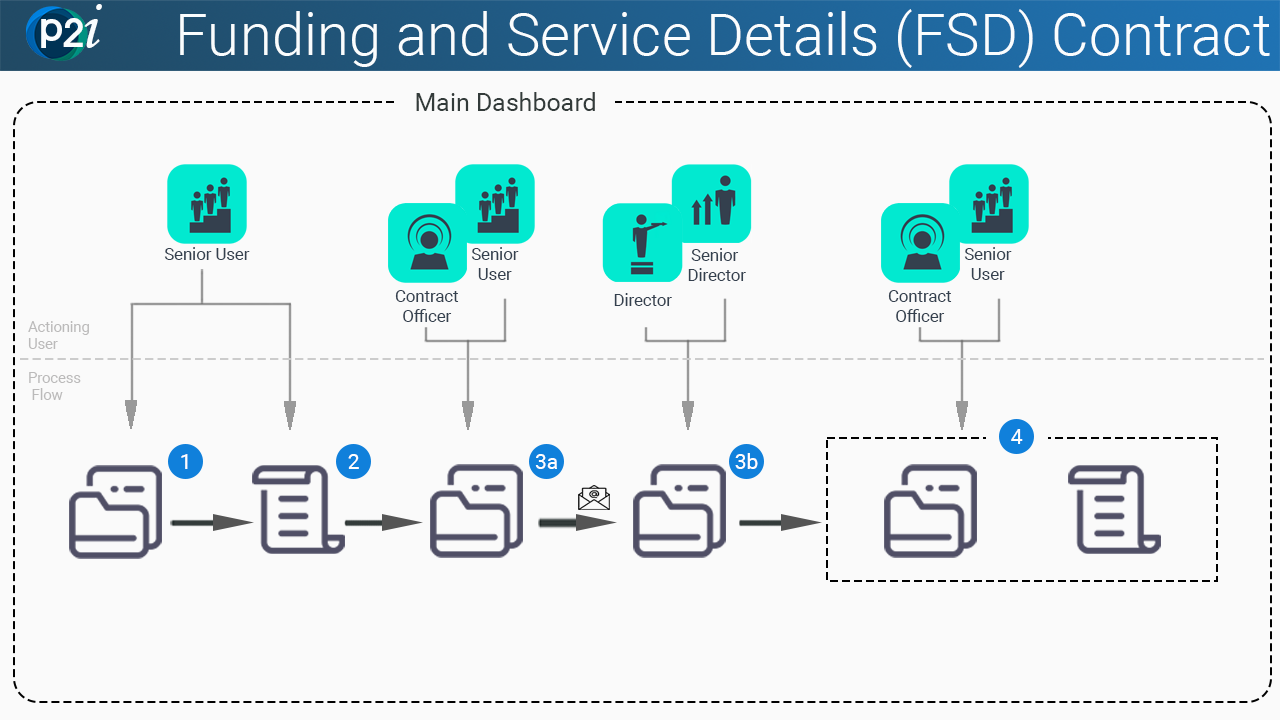
The P2i Senior User will:
The P2i Senior User will:
-
Set up an FSD contract - there are four actions:
-
enter Additional Information (i.e. manage the contract content)
-
generate an MCD
-
ensure contract is valid and ready for activation
-
change the contract's Contract Manager to the P2i Contract Officer
-
The P2i Contract Officer (or P2i Senior User) will:
-
Request FSD approval from the P2i Director / Senior Director
-
P2i sends an email notifying the approver of the approval task
The P2i Director / Senior Director will review the approval task (and appropriate attachments) and make a decision to:
-
approve - provide approval to proceed contract signing
-
deny - approval to continue to contract signing is denied
Warning Where approval is denied and the contract created and is not moving forward towards signing and activation, seek and follow department processes.
Example A department process may involve the FSD contract remaining in its current state and the FSD Project is invalidated. Refer to Invalidate a Project
Approve (or deny) an FSD contract approval request
The approval request comes as an email notification to the selected P2i Senior Director with a link to the approval task. On completion of the approval request, the requester receives a notification the request has been approved or denied.
The P2i Contract Officer (or P2i Senior User) will undertake actions based on approval:
-
Denied - organise close of the project
Warning Where approval is denied and the contract created and is not moving forward towards signing and activation, seek and follow department processes.
Example A department process may involve the FSD contract remaining in its current state and the FSD Project is invalidated. Refer to Invalidate a Project
-
Approved
Sign and execute FSD
-
(WET signatures only) undertake the activities to seek wet signature and attach a signed contract (refer to Wet signatures)
-
download the FSD contract and seek supplier (Funded Organisation) signature
-
attach signed FSD contract
-
confirm the FSD contract as signed
-
complete workflow task: Sign and execute FSD
-
-
(Electronic signature only) undertake the activities to electronically sign a contract (refer to Electronic signatures)
-
create signatories
-
request signature
-
electronically sign contract
-
confirm the FSD contract as signed
-
complete workflow task: Sign and execute FSD.
-
Activate FSD
Undertake contract activation activities (refer to Activate FSD)
-
ensure contract is valid ready for activation
-
activate the contract
-
complete workflow task: Activate FSD.
-